

shadcn/ui
A comprehensive guide to installing and configuring ShadCN UI components within RedwoodSDK projects, with step-by-step instructions for proper integration with TailwindCSS v4.
Installing shadcn/ui
Install shadcn/ui
npx shadcn@latest inityarn dlx shadcn@latest initpnpx shadcn@latest initbunx shadcn@latest initIt will ask you what theme you want to use.
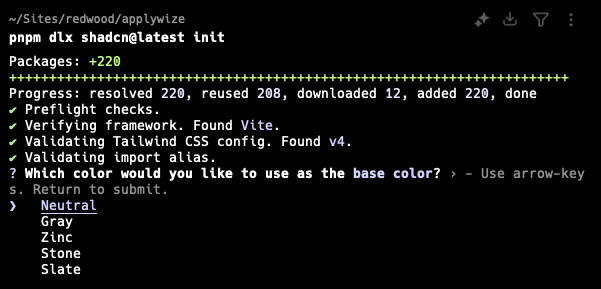
This command will create a components.json file in the root of your project. It contains all the configuration for our shadcn/ui components.
If you want to match RedwoodSDK conventions, add the following aliases to the components.json file:
...
"aliases": {
  "components": "@/app/components",
  "utils": "@/app/lib/utils",
  "ui": "@/app/components/ui",
  "lib": "@/app/lib",
  "hooks": "@/app/hooks"
},
...
shadcn/ui Organization
In our configuration, the lib directory is nested inside the app directory. The shadcn/ui command line tool may not honor our setup, creating another lib directory in the src (or @) directory. You'll need to manually move the folder to the app directory.
If you're copying and pasting code from the shadcn/ui website, you'll also need to update the import paths.
Now, you should be able to add components: You can add components in bulk by running:
npx shadcn@latest addyarn dlx shadcn@latest addpnpx shadcn@latest addbunx shadcn@latest addOr, you can add a single component by running:
npx shadcn@latest add <COMPONENT-NAME>yarn dlx shadcn@latest add <COMPONENT-NAME>pnpx shadcn@latest add <COMPONENT-NAME>bunx shadcn@latest add <COMPONENT-NAME>Components will be added to the src/app/components/ui folder.
- src/
- app/
- components/
- ui/
- components/
- app/
Toaster (sonner)
By default, the shadcn Toaster (from sonner) might not work if added directly to the Document because it needs to be client-side and properly encapsulated within the route tree where toasts are triggered.
To make it work:
- Create a "Client Component" for the Toaster.
- Create a Layout that encapsulates your routes.
- Render the Toaster within that Layout.
"use client";

import { Toaster as Sonner } from "@/app/components/ui/sonner";

export function Toaster() {
  return <Sonner />;
}import { Toaster } from "@/app/components/Toaster";
export function MainLayout({ children }: { children: React.ReactNode }) {
return (
<>
{children}
<Toaster />
</>
);
}React Server Components
By default, all pages and components within RedwoodSDK are server components. However, most of the ShadCN components require reactivity. Therefore, you may need to add use client to the top of your component file.